
Introduction
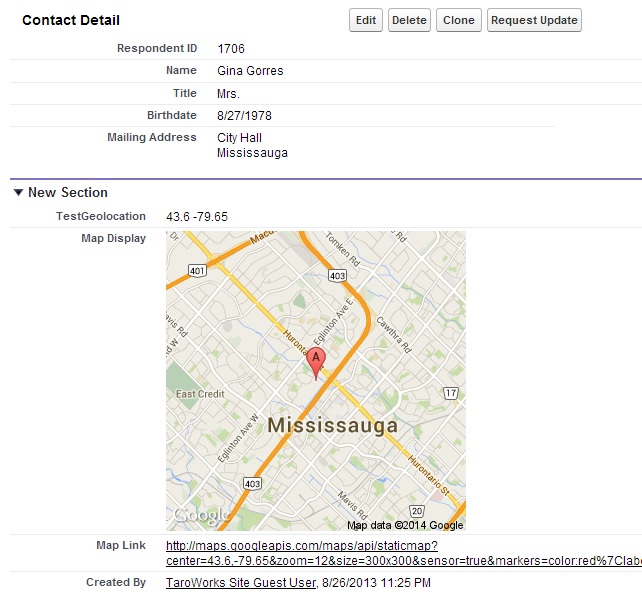
Showing a small map in a Salesforce record detail view can be very helpful in making decisions. TaroWorks allow you to create records and capture GPS location data from the field. The coordinates are stored in the Geolocation field type. This article will show how you can get a very neat map as shown below using two formula fields in your object.
Starting July 2019, Google Maps requires you register for API key which is a personal code provided by Google to access Google Maps. Your API key provides you with a free quota of Google Map queries. Your Google account will be automatically billed for any usage that exceeds your quota. Please follow these steps to signup for the API key so that maps displays on Salesforce record.
Steps
These steps assume that you have a Geolocation field (named "TestGeolocation" here) already created and mapped to a form question in TaroWorks.
- In the same object, create a text formula field called Map Link using the formula:
"http://maps.googleapis.com/maps/api/staticmap?center=" & TEXT(TestGeolocation__Latitude__s) & "," & TEXT( TestGeolocation__Longitude__s ) & "&zoom=12&size=300x300&sensor=true&markers=color:red%7Clabel:A%7C"& TEXT(TestGeolocation__Latitude__s) & "," & TEXT(TestGeolocation__Longitude__s) - Then, create another text formula field called Map Display using the formula:
IF( OR( ISBLANK( TestGeolocation__Latitude__s ) , ISBLANK( TestGeolocation__Longitude__s ) ) , "Missing Coordinates", IMAGE( Map_Link__c , "", 300,300))
Notes
- Your exact formula will change if you used a different name for your Geolocation field.
- You can also change the size of the map image, zoom level of the map, colour of the marker of the map (or even plot multiple points of the map!) if you are familiar with the URL format for the Google Map API.
- There is a limit on how often you can use (or "call" to use the technical term) these Google maps per day for free. For more intense usage, please contact Google.
Comments
2 comments
I get an error for the Map Link formula "Error: Field SchoolGeolocation__Latitude__s may not be used in this type of formula"
Similarly in the Map Display formula I get an error saying that I can't use Map Link in the formula. Am I using the correct field type? ("Text") Thanks
Hi Anna! Yes, it should be a text formula field. I'll reach open a ticket for you shortly and we'll post the solution here!
Please sign in to leave a comment.