
Introduction
A Purchase Order represents the movement of product into the ownership of your organization. This could be a sourcing of inventory from suppliers or donors which will result in increase in the Qty on-hand at the destination inventory.
Follow the steps below to create a TaroWorks Job that will Create a Draft Purchase Order upon Sync. A draft order does not have an impact on any inventory statuses, and is considered a work in-progress.
A. Configuring the Form
1. In the Question Builder Tab, create the following Sections and Questions:
| Question | Question Type | |
| Section Name: Order Information (Regular Section) | ||
| Q1 | Destination Location ID** | Text |
| Q2 | Destination Warehouse ID** | Text |
| Q3 | Order Type** | Single Select (Purchase Order) |
| Q4 | Date of Order* | Date |
| Q5 | Status** | Single Select (Draft) |
| Q6 | Expected Date of Delivery* | Date |
| Q7 | Supplier Contact ID** | Text |
| Q8 | Transport Cost* | Number |
| Question | Question Type | |
| Section Name: Order Line Items (Repeat/Table Section) | ||
| Q9 | Record Type** | Single Select (Purchase Order) |
| Q10 | Status** | Single Select (Draft) |
| Q11 | Product ID** | Text |
| Q12 | Product* | Text |
| Q13 | Quantity* | Number (Min 0) |
| Q14 | Unit Cost* | Number |
| Question | Question Type | |
| Section Name: Total (Regular Section) | ||
| Q15 | Total Amount Due | Number |
* Mark Question as Required
** Mark Question as Required & Hidden
2. Add the following dynamic operations to calculate and validate answers to the questions below :
Note: please replace any section names, question names, or picklist values that may be different in your org.
Q3 Order Type: Sets the Order Type to Purchase order.
Operation : Calculation
Javascript : tw.order_information.order_type.value="Purchase Order";
Q5 Status: Sets the status of the Purchase Order to Draft.
Operation : Calculation
Javascript : tw.order_information.status.value="Draft";
Q6 Expected Date of Delivery: Validates Expected Date of Delivery is later than today's date.
Operation : Validation
Javascript :  if(tw.order_information.expected_date_of_delivery.value<=tw.order.date_of_order.value) { throw "Date of Delivery must be after the date of order."; }
Q9 Record Type: Sets Record Type of Taro Order Line Item to "Purchase Order";
Operation : Calculation
Javascript : tw.order_line_items.current.record_type.value="Purchase Order";
Q10 Status: Sets Taro Order Line Item to "Draft";
Operation : Calculation
Javascript : tw.order_line_items.current.status_1.value="Draft";
Q15 Total Amount Due: Sums the total purchase order cost.
Operation : Calculation
Javascript : var sum =0; for(var i=0; i<tw.order_line_items.length; i++) { sum = sum + tw.order_line_items[i].unit_cost.value*tw.order_line_items[i].quantity.value; } tw.total.total_amount_due.value=sum + tw.order_information.transport_cost.value;
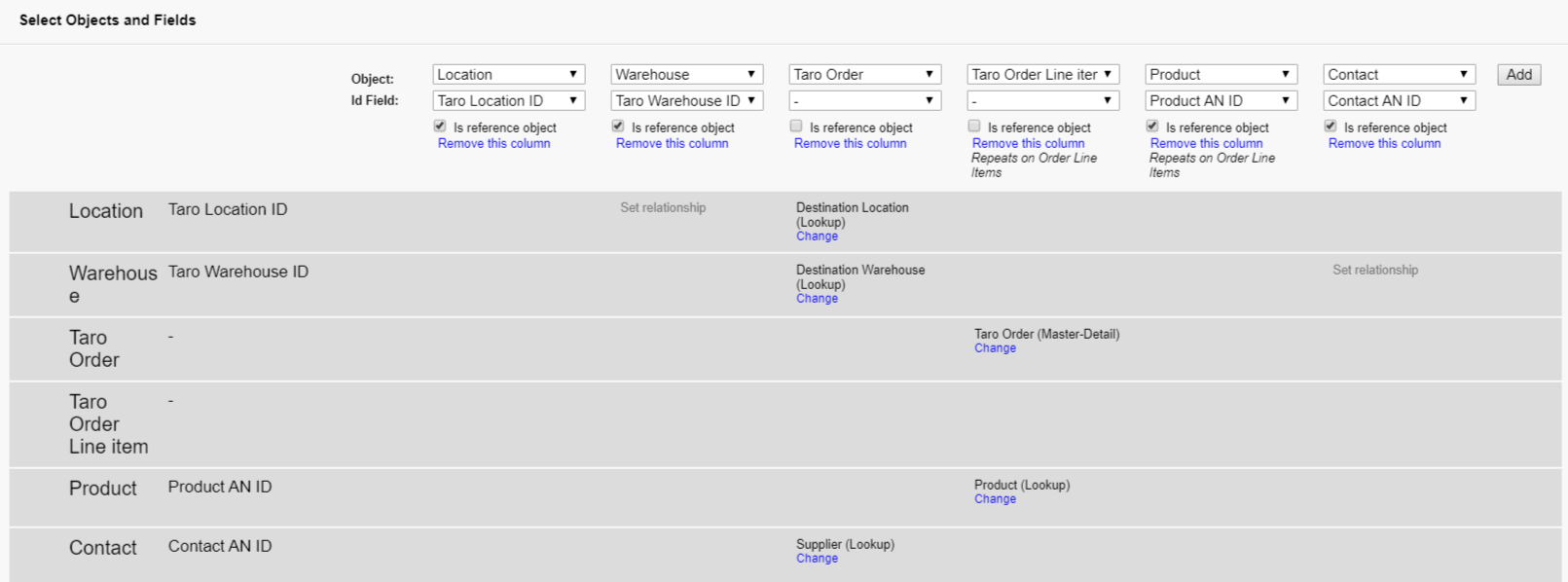
| Question | Question Type | Location | Warehouse | Taro Order | Taro Order Line item | Product | Contact | |
| Section Name: Order Information (Regular Section) | ||||||||
| Q1 | Destination Location ID** | Text | Taro Location ID | |||||
| Q2 | Destination Warehouse ID** | Text | Taro Warehouse ID | |||||
| Q3 | Order Type** | Single Select (Purchase Order) | Record Type ID | |||||
| Q4 | Date of Order* | Date | Date of Order | |||||
| Q5 | Status** | Single Select (Draft) | Status | |||||
| Q6 | Expected Date of Delivery* | Date | Expected Delivery Date | |||||
| Q7 | Supplier Contact ID** | Text | Contact ID | |||||
| Q8 | Transport Cost* | Number | Transport Costs | |||||
| Question | Question Type | Location | Warehouse | Taro Order | Taro Order Line item | Product | Contact | |
| Section Name: Order Line Items (Repeat/Table Section) | ||||||||
| Q9 | Record Type** | Single Select (Purchase Order) | Record Type ID | |||||
| Q10 | Status** | Single Select (Draft) | Status | |||||
| Q11 | Product ID** | Text | Product AN ID | |||||
| Q12 | Product* | Text | ||||||
| Q13 | Quantity* | Number (Min 0) | Qty Ordered | |||||
| Q14 | Unit Cost | Number | Unit Cost | |||||
| Question | Question Type | Location | Warehouse | Taro Order | Taro Order Line item | Product | Contact | |
| Section Name: Total (Regular Section) | ||||||||
| Q15 | Total Amount Due | Number | ||||||
Note: If a question isn't mapped, it is only for display purposes.
B. Configuring the Job
1. In a new Job, create 2 drill-down hierarchies:
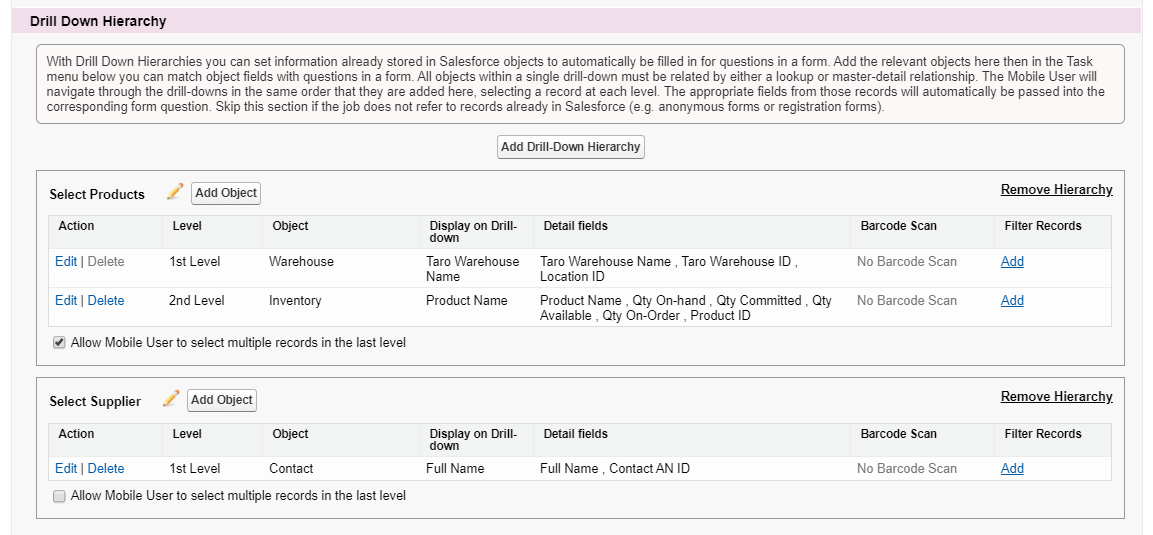
Note: check "Allow Mobile User to select multiple records in the last level" for the Select Products drill-down hiearchy
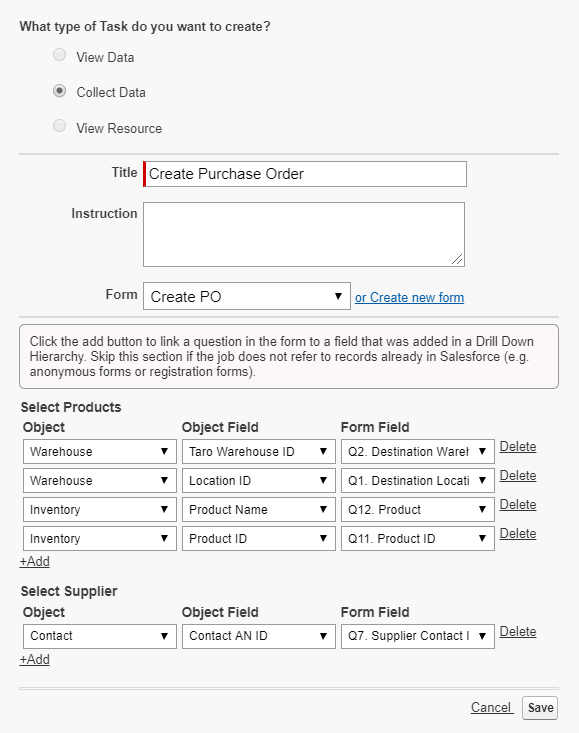
2. Create a new Collect Data Task as shown to add the From created above.
3. Map values from the drill-down hierarchies into Form questions as shown below.
4. Click Save, save the job and Publish it.
Comments
0 comments
Please sign in to leave a comment.