
Introduction
From the time that a Taro Order is created until it is completed, there are various statuses through which it can progress. Added to that, their are various different paths that a Taro Order can take depending on the context of the order.
A Taro Order is comprised of one or more Taro Order Line Items that each contain information regarding a specific product that is part of the order. The statuses of these Taro Order Line Items also change depending on the stage in which the Taro Order Line Item is in as well as the stage in which the Taro Order as a whole is in.
In this document, we will describe the various statuses that both a Taro Order and a Taro Order Line Item can progress through. From TaroWorks Enterprise version 1.3, we have introduced a new status called Shipping. An order may or may not progress through this status. As a result, the two sections of this document describe a Taro Order's progression through the statuses with and without Shipping.
A. Status Progression with Shipping
An order progresses through the Shipping status when you want to track the changes in inventory at the Source warehouse when that product is in transit for a certain duration. Although all types of orders can include a time whereby the order is in transit, this shipping status is only available for Transfer and Sales orders and NOT Purchase orders. This is due to the fact that often times, the client will not have access to the supplier's inventory levels.
Shipping Setup
Both Transfer Orders and Sales Orders can progress through the Shipped status. To track an order through the Shipped status you will need to set the Record Shipment field to Yes on the Taro Order at the point of creation.
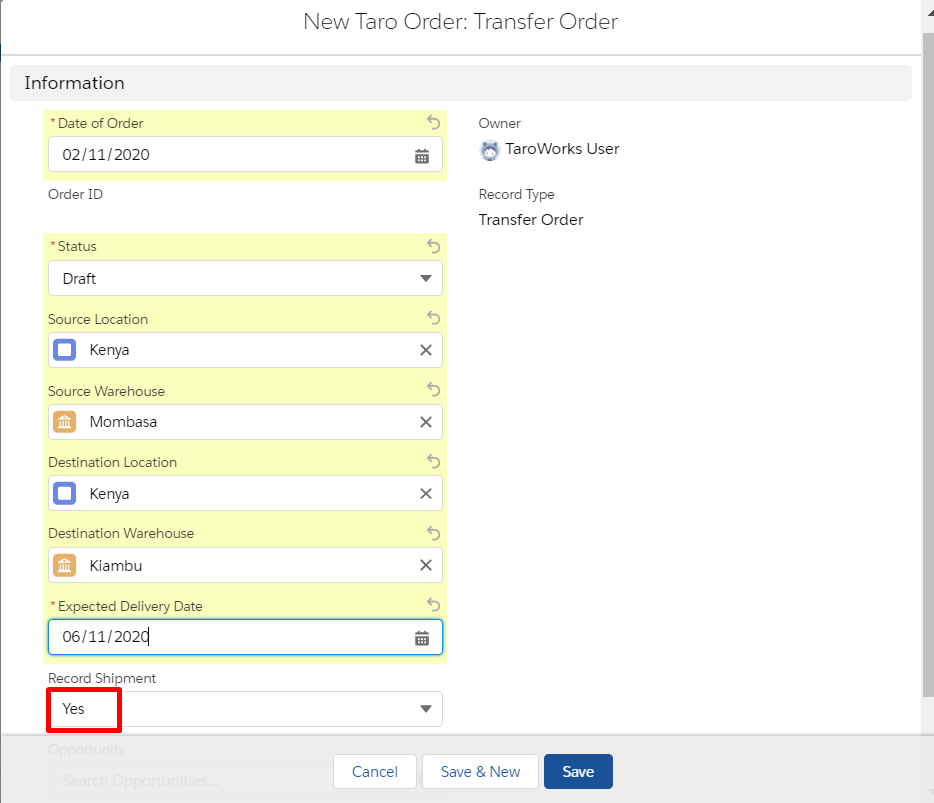
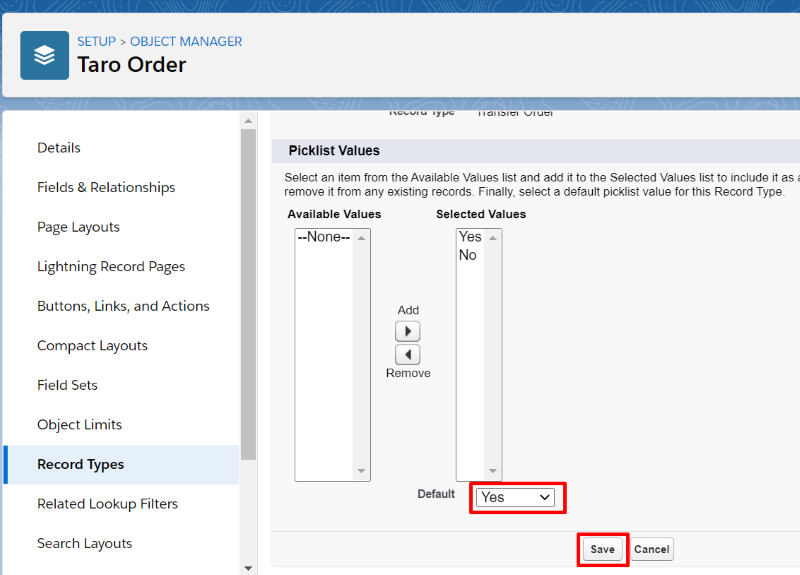
By default, the Record Shipment field is set to Yes on a Transfer Order and No on a Sales Order. You can change this default by:
- Click Setup

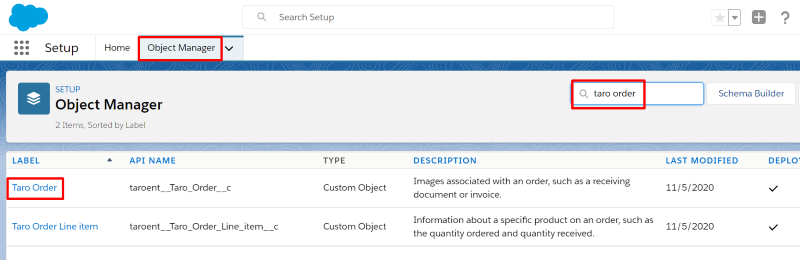
- Click Object Manager, search for Taro Order and click Taro Order
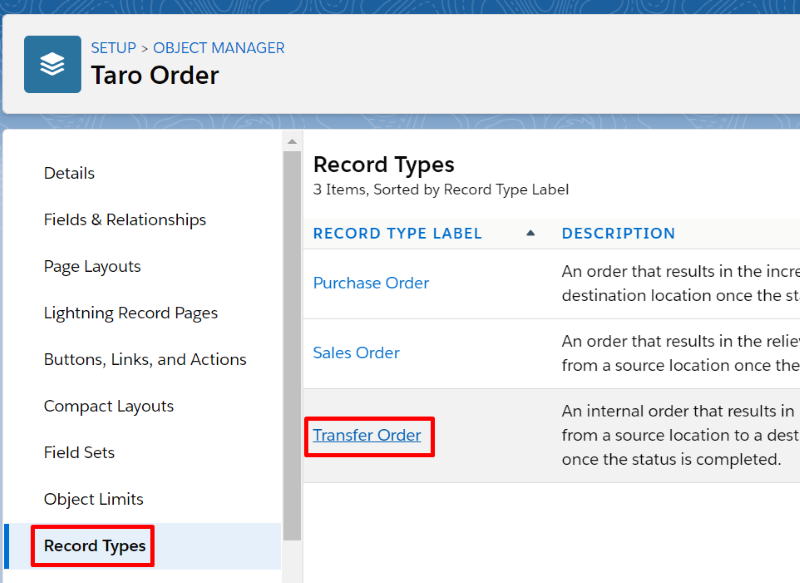
- Click Record Types and select the Record Type you would like to change (in this example we will click on Transfer Order)
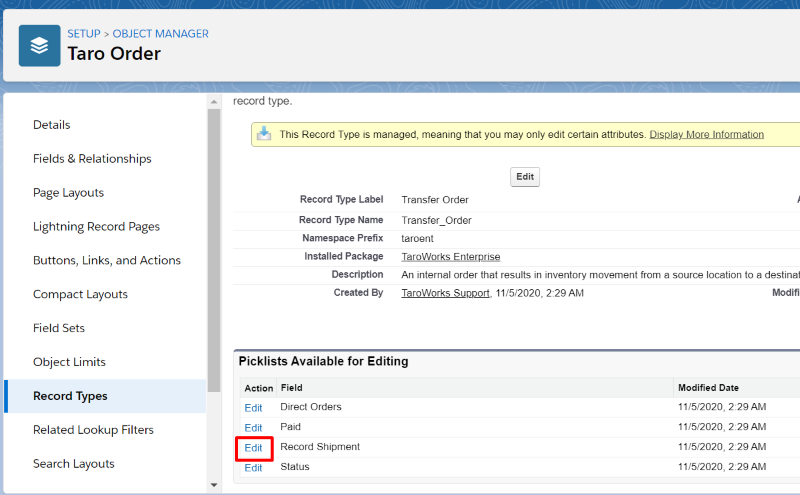
- Click Edit next to Record Shipment
- Change the default value and click Save
Taro Order Statuses
When the status of an order and/or the order line item/s changes, there may be changes to the inventories of the products. The tables below display the progression of the Taro Orders and the Taro Order Line items through the different statuses and the accompanied changes to the inventories.
| Draft | Change status to Confirmed | Shipped | Completed | |
| Transfer Order |
There is no impact to inventory. This is a work in progress |
- Qty on Order for the destination inventory will increase by the Qty Ordered - Qty Committed for the source inventory will increase by the Qty Ordered |
X | X |
| Purchase Order |
There is no impact to inventory. This is a work in progress |
- Qty on Order for the destination inventory will increase by the Qty Ordered |
N/A | X |
| Sales Order |
There is no impact to inventory. This is a work in progress |
- Qty Committed for the source inventory will increase by the Qty Ordered |
X | X |
Taro Order Line Item Statuses
| Draft | Confirmed | Last Qty Shipped > 0 and Change Status to Shipped | Last Qty Delivered > 0 and Change Status to Completed | |
| Transfer Order Line Items |
There is no impact to inventory. This is a work in progress |
X |
- Qty on Hand and Qty Committed at the source inventory will decrease by the Qty shipped -Inventory movement - deducted for source inventory by the Last Qty Delivered |
- Qty on Hand and Qty Available at destination inventory will increase by Qty delivered - Qty on-Order at destination inventory will decrease by Qty delivered - Inventory Movement - increase of destination inventory by the Last Qty Delivered |
| Purchase Order Line Items |
There is no impact to inventory. This is a work in progress |
X | N/A |
-Qty on Hand at the destination inventory will increase based on the Last Qty Delivered -Qty On Order will decrease by the Last Qty Delivered for destination Inventory -Inventory movement is created for destination inventory by the Last Qty Delivered |
| Sales Order Line Items |
There is no impact to inventory. This is a work in progress |
X |
- Qty on Hand and Qty Committed at the source inventory will decrease by the Qty shipped -Inventory movement is deducted for source inventory by the Last Qty Delivered |
X |
X represents the change of status is not performed on this level e.g. the status is changed from Confirmed to Shipped on a Taro Order Line Item level.
B. Status Progression without Shipping
Taro Order Statuses
|
Draft |
Change status to Confirmed |
Completed |
|
|
Transfer Order |
There is no impact to inventory. This is a work in progress |
- Qty on Order for the destination inventory will increase by the Qty Ordered - Qty Committed for the source inventory will increase by the Qty Ordered |
X |
|
Purchase Order |
There is no impact to inventory. This is a work in progress |
- Qty on Order for the destination inventory will increase by the Qty Ordered |
X |
|
Sales Order |
There is no impact to inventory. This is a work in progress |
- Qty Committed for the source inventory will increase by the Qty Ordered |
X |
Taro Order Line Item Statuses
| Draft | Confirmed | Last Qty Delivered > 0 and Change Status to Completed | |
| Transfer Order Line Items |
There is no impact to inventory. This is a work in progress |
X |
-Qty on Hand and Qty Available at the source inventory will decrease based on the Last Qty Delivered -Qty Committed at the source org will be relieved by the Last Qty Delivered -Qty on Hand and Qty Available at the destination inventory will increase based on the Last Qty Delivered -Qty on Order at the destination org will be relieved by the Last Qty Delivered -Inventory movement is created for destination inventory by the Last Qty Delivered -Inventory movement is deducted for destination inventory by the Last Qty Delivered |
| Purchase Order Line Items |
There is no impact to inventory. This is a work in progress |
X |
-Qty on Hand at the destination inventory will increase by the Last Qty Delivered -Qty On Order at the destination inventory will decrease by the Last Qty Delivered. -Inventory movement is created for destination inventory by the Last Qty Delivered |
| Sales Order Line Items |
There is no impact to inventory. This is a work in progress |
X |
-Qty on Hand and Qty Available at the source inventory will decrease based on the Last Qty Delivered -Qty Committed at the source org will be relieved by the Last Qty Delivered -Inventory movement is deducted from source inventory |
X represents the change of status is not performed on this level e.g. the status is changed from Confirmed to Shipped on a Taro Order Line Item level.
Comments
0 comments
Please sign in to leave a comment.